
Managing money used to feel like a chore until I brought it into my Notion workspace. In 2025, I tried everything from complex spreadsheets to simple pen-and-paper tracking. What I discovered is that the best system isn’t the most complex one; it’s the one you actually enjoy using. As we look toward 2026, here is my breakdown of how to find (or build) the ultimate Notion budget template.
What is a Notion Budget Template?
In my experience, a Notion budget template is more than just a table of numbers; it’s a living system. I see it as a financial “command center” where I can track my spending, monitor my investments, and plan for the future all in one place.
It is incredibly useful because it removes the scatter factor. I used to have my bank app in one place and my goals in another. Now, everything is centralized. If I’m planning a trip or a new business investment, I don’t have to guess if I have the funds; I just check my Notion budget template.
I’ve used Notion budget templates for almost every area of my life, and I’ve seen them work for:
- Small Businesses: I use mine to track revenue, calculate profit/loss, and even estimate taxes.
- Freelancers & Solopreneurs: It’s how I separate my “work money” from my “life money.”
- Individuals & Couples: I’ve found it’s the best way to stay on the same page with a partner regarding shared expenses.
The Best Notion Budget Template
I’ve tested dozens of templates, and the “best” ones always share three specific qualities:
The Essential Characteristics
- Low Friction (The 5-Second Rule): If I’m at a grocery store, I need to be able to log my spending before I even walk to my car. If a template is too fussy or buried under too many sub-pages, I know I won’t use it.
- Visual Logic: I need to see my financial health without reading a single number. The best systems use visual cues, like colors or progress indicators, so I can feel how I’m doing at a glance.
- Actionable Data: A list of expenses is just a graveyard of numbers. A great template tells me what to do next. It should highlight where I’m overspending so I can adjust my behavior in real-time.
Questions Your Template Must Answer
- Where is my money going? (Is it rent, or is it too many Friday nights out?)
- Where did my money come from? (Which client or income stream is the most profitable?)
- How much do I have left for this week? (Not just for the month!)
- Am I on track for 2026? (Am I actually saving for that big goal?)
Must-Have Notion Features
- Button Blocks: I place these at the very top of my mobile page for “Quick Add” transactions. It saves me from digging into databases.
- Native Notion Charts: This is a game-changer. I use them to see a visual pie chart of my spending categories so I can see exactly where the leaks are.
- Formulas 2.0: I use advanced formulas to create Over-Budget Alerts. For example, if my “Dining Out” category exceeds my limit, the template automatically displays a warning.
- Automations: I love setting up automations so that when a “Project” is marked as “Done,” a corresponding “Income” entry is automatically drafted.
- Linked Database Views: I use a Calendar view for my recurring bills and a Table view for my deep-dive monthly
Examples of FREE Top-Rated Budget Templates from Notion Marketplace
Personal Finance Tracker By Notion
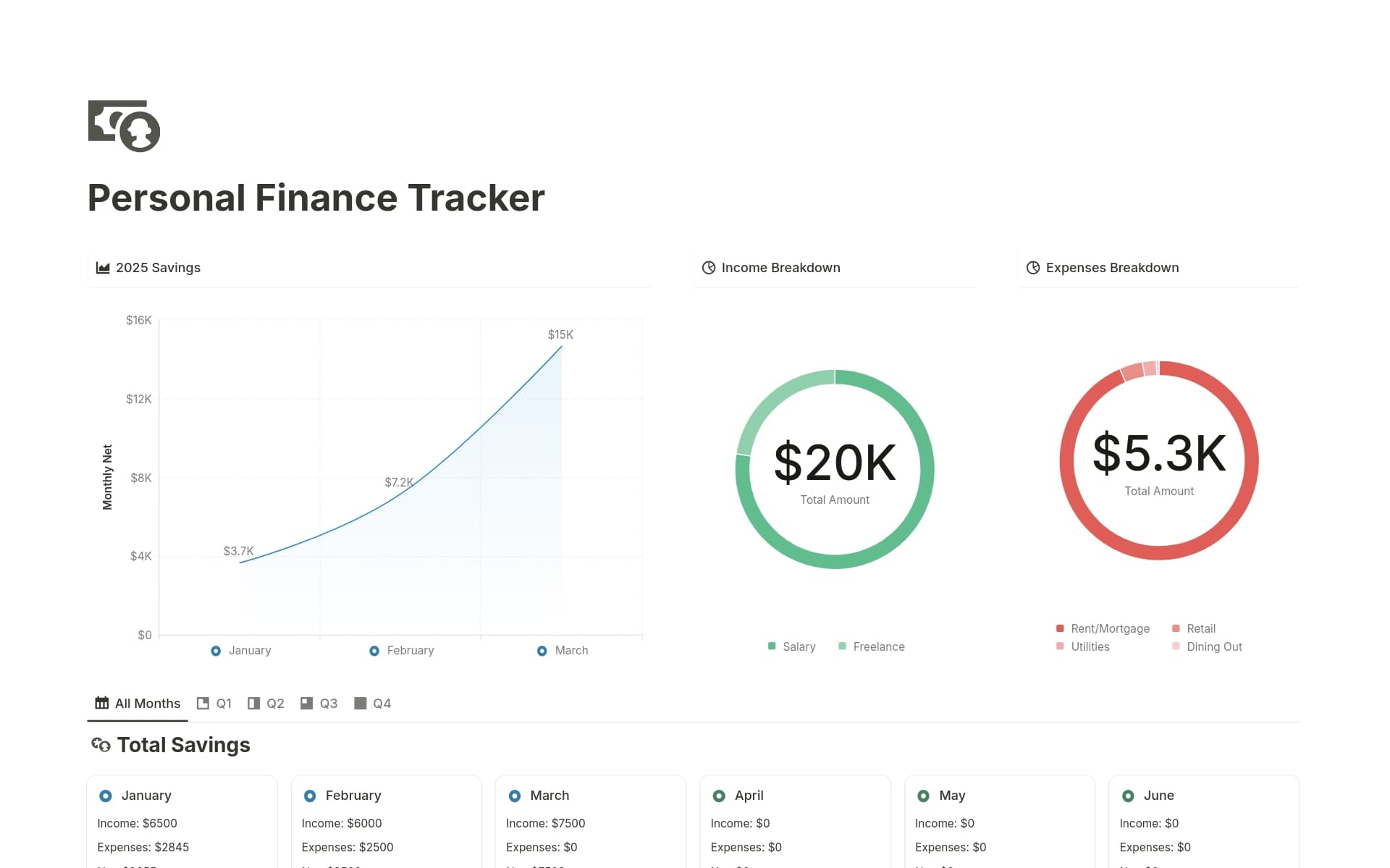
I looked into this tracker and saw how it uses automations to log dates automatically. I found the “tax nudge” feature especially useful for freelancers and solo entrepreneurs who need to stay organized with multiple income streams and make better-informed financial decisions.
Household Budget Sheet By Notion
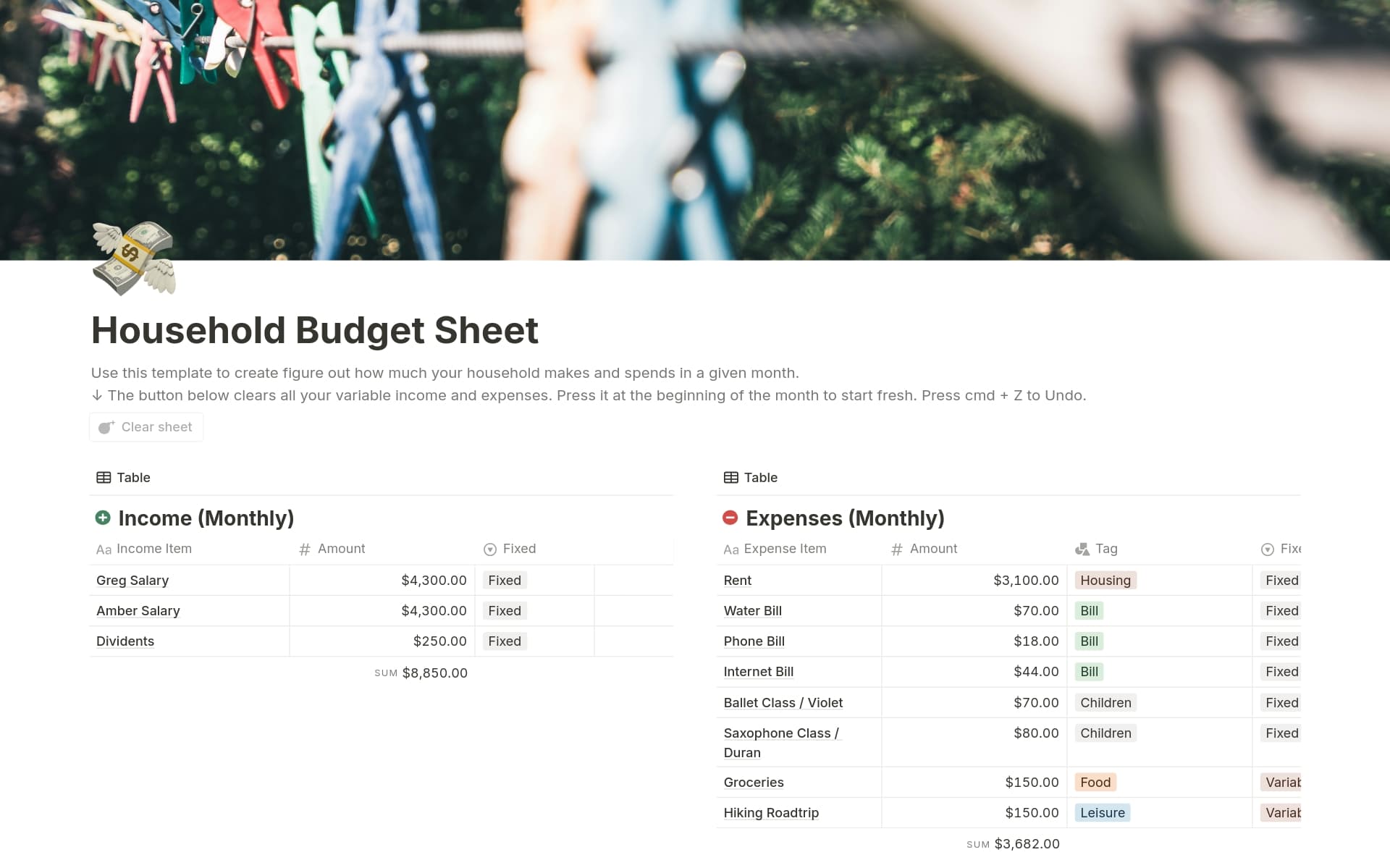
I checked out this template and saw how well it handles everything from rent to kids’ activities. I looked at the tagging system and found that it really simplifies the analysis process. It’s a solid pick for families who want a clearer view of their spending.
Final Thoughts
If you’re setting up your budget tracking system for 2026, here is my “pro” advice after years of trial and error:
- The “Weekly Review” Ritual: I added a “Review” checkbox to my transactions. Every Sunday, I check them off as I verify them against my bank account. This 10-minute habit is what actually keeps me disciplined.
- Don’t Over-Categorize: I used to have 30 categories. It was a nightmare. Now, I keep it to 8 or 10. It makes the data much easier to read.
- Connect Your Goals: My budget isn’t just about spending; it’s about earning. I link my budget to my “2026 Vision Board” database. Seeing my “Dream Home” progress bar go up every time I save makes the sacrifice feel worth it.
- Automated Tax Buffer: Since I do freelance work, I added a formula that automatically calculates a 20% of Tax Hold on every income entry, so I never accidentally spend money I owe.
- The Sinking Funds Strategy: I created a separate view for annual expenses like car insurance. I save a small amount monthly so that when the big bill hits, I’ve already paid myself for it.
- Mobile-First Layout: I always design a specific “Mobile Dashboard” with extra-large buttons. If I can’t log a purchase while walking to my car, I simply won’t do it.
